

Extending Automated Verification with Custom Sequences in IDS-Verify
Pinku Kumar
Overview
Verification of Control and Status Registers (CSRs) is a critical phase in IP and SoC development. It often requires significant time and effort to ensure correct behavior across different scenarios. Any modification in the design can restart the verification cycle, making the process repetitive and resource-intensive.
IDS-Verify simplifies this process through specification-driven automation, generating complete verification environments directly from register specifications. In addition to automation, IDS-Verify provides custom sequence support, enabling engineers to define design-specific verification scenarios while maintaining a fully automated flow.
Why Custom Sequences Are Important
While automatically generated tests provide strong baseline coverage, real-world designs often require:
Validation of design-specific functionality
Testing of corner cases and complex scenarios
Simulation of real application-level behavior
Custom sequences allow engineers to extend automated verification with targeted test scenarios, improving confidence in design correctness which helps in achieving 100% coverage.
Automated Verification with IDS-Verify
From a single specification, IDS-Verify automatically generates:
UVM testbench
Register Abstraction Layer (RAL)
Verification sequences
Assertions
Documentation
This ensures:
Consistency across design and verification
Reduced manual effort
Faster verification setup
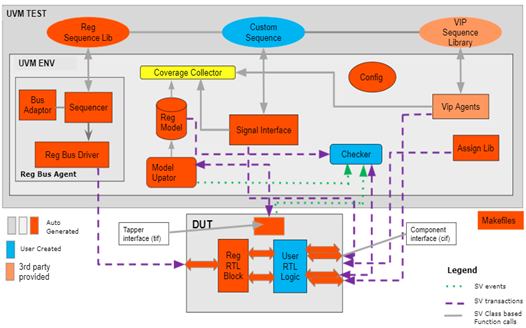
Custom Sequence Integration Flow
Custom sequences can be integrated into IDS-Verify using:
- IDS-NG Sequence Editor
- PSS (Portable Stimulus Standard)
Both approaches allow seamless integration with the specification-driven flow.
A. Using Register Specification in SystemRDL and Sequences in IDS-NG
- Create the register specification in SystemRDL:
a. Define the complete register map using SystemRDL.
b. Use the seq_refpath property in the SystemRDL specification to reference the IDS-NG sequence.
SystemRDL Register Specification:
property seq_refpath {type=string;component=addrmap;};

addrmap block1{

 seq_refpath="test.idsng";

 regfile section1 {

 reg reg1 {

   field {

     sw=r;

     hw=rw;

   }f1[31:0]=0x0;

 };

 reg reg2 {

   field {

     sw=w;

     hw=rw;

   }f2[31:0]=0x0;

 };

 reg reg3 {

    field{}f3[31:0]=0x0;

 };

 reg1 reg1;

 reg2 reg2;

 reg3 reg3;

 };section1 section1;

};
- Creating a Custom Sequence in IDS-NG
- Launch the IDS-NG tool on your system
- Go to the menu: File → New File → Sequence Spec
- This opens the template to create a new sequence specification file
- Specify File Path and Name
- Choose the directory where the sequence file will be saved.
- Provide a descriptive file name that reflects the purpose of the sequence.
- Click OK / Create to generate the new sequence file.
4. This will open the sequence template,
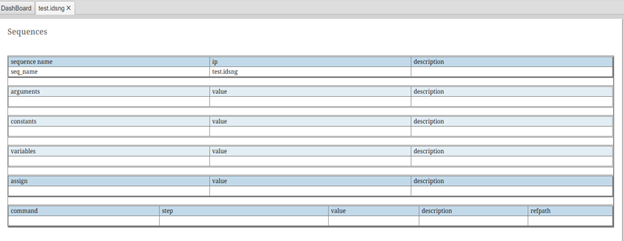
5. Select the IP(.rdl file name) and then write the sequence based on user logic
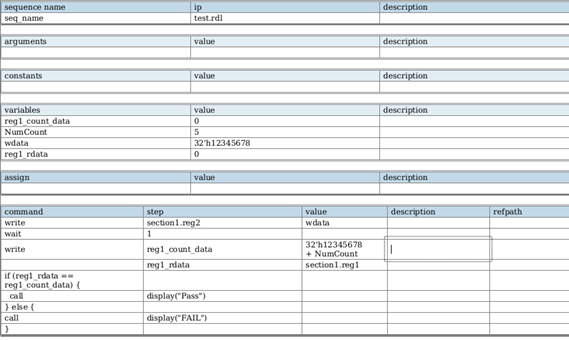
6. Save the file.
7. Use the following command to generate output from the input specification:
idsbatch <input-file> -out “verilog uvm arv iss_uvm” -bus <bus_name> -dir <output_dir>
<input-file>: SystemRDL or IDS-NG input file
-out iss_uvm: Generates the custom uvm sequence output
-bus : Defines the target bus protocol
-dir <output_dir>: Output directory name for generated files
8. This will generate the ARV environment with the custom sequence.
9. Users can run both the main sequence and the custom sequence during verification
- Go to output_dir/arv directory to run the simulation. Run below command to run the simulation.
make -f Makefile.questa run
B. Using Register Specification in SystemRDL and Sequences in PSS
- Create the register specification in SystemRDL:
a. Define the complete register map using SystemRDL.
b. Use the seq_refpath property in the SystemRDL specification to reference the PSS sequence.
SystemRDL Register Specification:
property seq_refpath {type=string;component=addrmap;};

addrmap block1{

 seq_refpath="test.idsng";

 regfile section1 {

 reg reg1 {

   field {

     sw=r;

     hw=rw;

   }f1[31:0]=0x0;

 };

 reg reg2 {

   field {

     sw=w;

     hw=rw;

   }f2[31:0]=0x0;

 };

 reg reg3 {

    field{}f3[31:0]=0x0;

 };

 reg1 reg1;

 reg2 reg2;

 reg3 reg3;

 };section1 section1;

};
2. Creating a Custom Sequence in PSS
 import std_pkg::*;

 component block {

     import block1_regs_pkg::*;

     section1_regs_c section1;

     action test1 {

           reg1_reg_s reg1_1;

           reg2_reg_s reg2_1;

           int reg1_count_data;

         exec post_solve {

         }


         exec body {

            int NumCount = 5;

            bit[32] wrdata = 12345678;

            reg2_1.f2 = wrdata;

            int reg1_count_data = NumCount + 1234567 ;

            if (section1.reg1.read().f1  == reg1_count_data) {

               message( NONE, "Pass");

            } else {

               message( NONE, "FAIL");

            }

        }

     }

}
Save the files.
Use the following command to generate output from the input specification:
idsbatch <input-file> -out “verilog uvm arv iss_uvm” -bus <bus_name> -dir <output_dir>
<input-file>: SystemRDL or IDS-NG input file
-out iss_uvm: Generates the custom uvm sequence output
-bus : Defines the target bus protocol
-dir <output_dir>: Output directory name for generated files
3. This will generate the ARV environment with the custom sequence. Users can run both the main sequence and the custom sequence during verification
4. Go to output_dir/arv directory to run the simulation. Run below command to run the simulation.
make -f Makefile.questa run
Generated custom sequence output :
class uvm_block1_test1_seq extends uvm_reg_sequence#(uvm_sequence#(uvm_reg_item));

   `uvm_object_utils(uvm_block1_test1_seq)

   uvm_status_e status;

   block1_block rm ;

   function new(string name = "uvm_block1_test1_seq") ;

       super.new(name);

   endfunction

   int NumCount ;

   int wrdata ;

   int reg1_count_data ;

   int lvar;

   task body;

      …

…

…

       NumCount='h5;

       rm.section1.reg4.f4.write(status, NumCount, .parent(this));

       wrdata='h12D687;

       rm.section1.reg2.f2.write(status, wrdata, .parent(this));

       lvar = NumCount + 1234567;

       reg1_count_data=lvar;

       rm.section1.reg1.f1.read(status, section1_reg1_f1, .parent(this));

       if (section1_reg1_f1 == reg1_count_data) begin

           `uvm_info("ISS", $sformatf("Pass"),UVM_LOW);

       end

       else begin

           `uvm_info("ISS", $sformatf("FAIL"),UVM_LOW);

       end

   endtask: body

endclass: uvm_block1_test1_seq

…

…

…
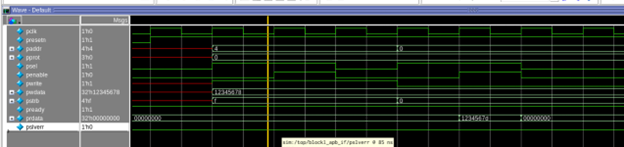
Simulation Result :
Below is the simulation output demonstrating the execution of the generated custom sequence:
Why It Matters
Traditional verification flows require manual integration of custom sequences into UVM environments, increasing effort and risk of inconsistencies.
IDS-Verify eliminates this gap by allowing custom sequences to be defined at the specification level and automatically integrated into the generated environment. This ensures consistency, scalability, and faster verification cycles.
Conclusion
This example shows how IDS-Verify enables users to integrate custom register-based sequences directly from the specification. By supporting sequences created in IDS-NG or PSS, the tool seamlessly incorporates user-defined verification scenarios into the automatically generated UVM environment.
This flexibility allows engineers to extend automated verification with design-specific tests while maintaining the benefits of specification-driven automation and high coverage, faster debugging, and improved overall design quality.