

IDS-CF (IDesignSpec Collaboration Framework) is a platform-independent, GUI-based tool that enables seamless collaboration between hardware and software teams throughout the SoC development lifecycle. It provides a unified, template-driven environment for capturing complete SoC specifications and generating outputs such as RTL, UVM testbenches, firmware headers, and documentation, with AI capabilities.
As design projects evolve, managing multiple design files and keeping track of changes across revisions can become challenging. Traditional command-line Git workflows can also make version tracking less accessible within the design environment.
To address this, IDS-CF now integrates Local Git directly into the application, allowing users to track design changes, maintain version history, and manage their design files without leaving IDS-CF.
Track Your Design Changes
As you work on your design, IDS-CF lets you quickly see which files have been modified, added, deleted, or renamed. Staged and unstaged changes are listed separately, so you can review the differences before committing and understand exactly what has changed.
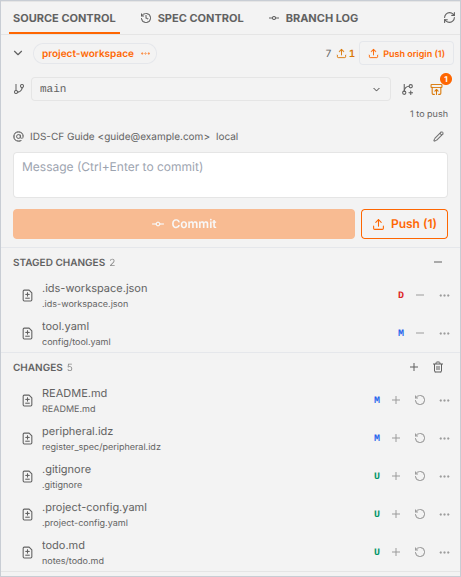
Figure 1: Source Control panel showing staged and unstaged changes in IDS-CF
Instead of maintaining multiple copies of a design to track different versions, Git keeps the changes organized within the project history.
Keep a Clear Version History
With Git commits, each important design update can be saved as a version in the project history. The Branch Log lets you review previous commits, see whether each one has been pushed, and expand a commit to view the files it changed.
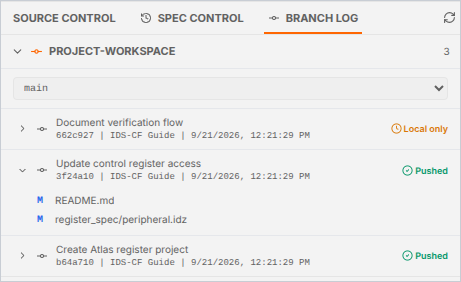
Figure 2: Branch Log showing the commit history and the files changed in a commit
Selecting a changed file opens a side-by-side before-and-after comparison, making it easier to understand what changed, when it changed, and how the design evolved.

Figure 3: Side-by-side comparison of a file before and after a commit
Work Safely on New Changes
When developing a new feature or trying an alternative design, you can create a separate Git branch in IDS-CF. This allows you to work independently without affecting the main design until the changes are ready.
If you switch branches with pending changes, IDS-CF lets you choose how to handle them: carry the changes over, stash them for later, commit and push before switching, or discard them. Stashing lets you set unfinished work aside and restore it when you are ready to continue.
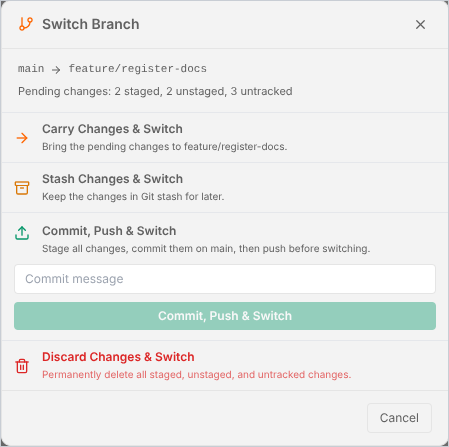
Figure 4: Switch Branch dialog with options for handling pending changes
Collaborate Through a Shared Repository
When working with a team, you can fetch, pull, and push changes through a shared Git repository directly from the Source Control panel. Merging a branch into the current one, managing stashes, and configuring the remote are all available from the same menu.
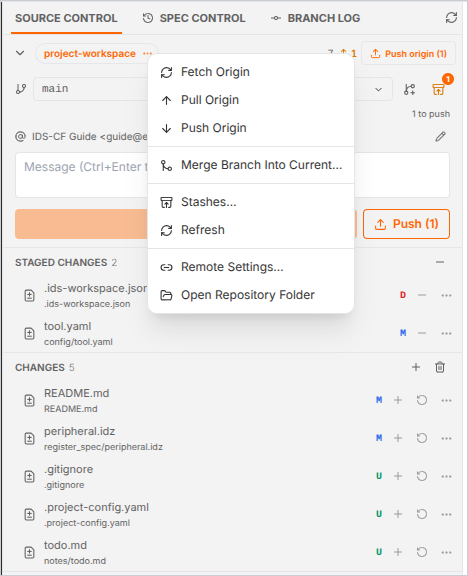
Figure 5: Repository menu with Fetch, Pull, Push, Merge, Stashes, and Remote Settings
Compare Designs at the Register Level
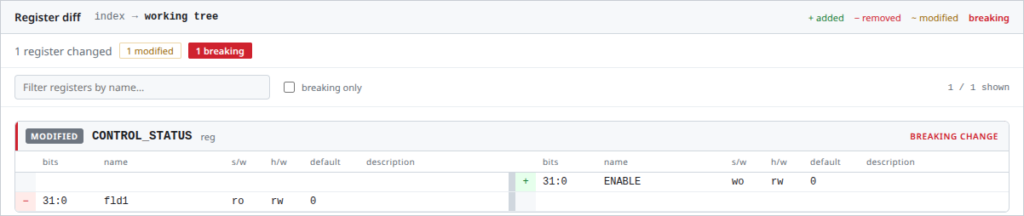
For .idz files, IDS-CF goes beyond a plain text comparison. The register diff shows which registers and fields were added, removed, or modified, and flags breaking changes, so you can review the impact of a change on the design itself rather than on raw file content.
Figure 6: Register diff highlighting a breaking change in the CONTROL_STATUS register
Key Benefits
Using Git with IDS-CF provides several practical benefits:
- Better version tracking– Keep a clear history of design changes.
- Easy change review– See exactly what was added, modified, or removed before committing.
- Easy recovery– Review previous versions and restore work when needed.
- Better collaboration– Push and pull changes through a shared Git repository when working with a team.
- Design-aware comparison– For .idz files, review register and field-level changes instead of only comparing raw file content.
Conclusion
Local Git integration makes version control a natural part of the IDS-CF design workflow. By bringing change tracking, version history, branching, and file comparison into the same environment, it helps designers manage their work with greater clarity and confidence.
Whether you are making a small design update, experimenting with a new feature, or working as part of a team, Git provides a reliable way to track changes, preserve design history, and keep your project organized throughout its development.